JTM AutoExecutorTwo engines. Two cockpits.
Up to forty accounts.
An automated execution platform for NinjaTrader 8. AutoExecutor runs your rules, manages the bracket, and replicates every fill across your other accounts — while you watch it happen, line by line.
Try it first
Free in Market Replay, permanently
You do not have to take our word for any of this. Run both engines against your own history, for as long as you like, before you pay anything.
Free, permanently, in replayThe JTM AutoTrader System is available for NinjaTrader 8 Market Replay — both engines, not one: WatchdogXr as an armed indicator and TeleXr as an armed strategy. Test them as much as you like, on as much history as you like, at no cost and with no expiry — replay is free forever, not a trial window.
Get the JTM AutoTrader System
Tell us who you are and the download appears below.
We will email you once when AutoExecutor goes live on 13 September, and nothing else. No list, no sequence, unsubscribe in one click.
Check your inbox — and here is the download
One NinjaTrader 8 protected assembly containing the whole system — WatchdogXr (runs as an armed indicator) and TeleXr (runs as an armed strategy). Both are in this single file.
↓ JTMAutoExecutor_NT8Assets_v2.3.13.zip- Tools → Import → NinjaScript Add‑On, select the zip, then restart NinjaTrader.
- Connect to Market Replay and open a chart on a Playback account. Sim and live accounts will not trade — that is the licence gate, not a fault.
- The indicator. Right‑click the chart → Indicators →
JTM AutoExecutor → Add. It arms itself on the first live replay bar and
prints
SELF‑ARMEDin the Output window. - The strategy. Right‑click the chart → Strategies → JTMTeleXrStrategy → Add, set Method, tick Enabled.
- Press play. Your trade journal is written to
Documents\NinjaTrader 8\JTMReportsas CSV — there is no cockpit in replay, so the CSV is your record.
| Account | Trades | |
|---|---|---|
| Market Replay (Playback101+) | Yes | Free, no expiry |
| Backtest | Yes | Free, no expiry |
| Sim101 | No | Needs an AutoExecutor subscription |
| Live / funded | No | Needs an AutoExecutor subscription |
Instruments
Fourteen instruments carry a calibrated bracket
Each row below has its own stop distance, base size and scale‑in size, derived so that risk per position lands on the same rule across the board — about $500 per contract on the minis, $250 at five contracts on the micros, with silver the deliberate exception. Without this every instrument would inherit NQ’s numbers: one MNQ contract risking $75 against a cap that could never engage, or a stop on SI tight enough to sit inside the noise.
| Instrument | Stop (ticks) | Base | Scale‑in | Max legs |
|---|---|---|---|---|
| NQ E‑mini Nasdaq‑100 — calibrated | 150 | 1 | 1 | 6 |
| ES E‑mini S&P 500 | 40 | 1 | 1 | 6 |
| RTY E‑mini Russell 2000 | 100 | 1 | 1 | 6 |
| YM E‑mini Dow | 100 | 1 | 1 | 6 |
| GC Gold | 50 | 1 | 1 | 6 |
| CL Crude oil | 50 | 1 | 1 | 6 |
| SI Silver — no pyramid | 50 | 1 | 1 | 1 |
| MNQ Micro Nasdaq‑100 | 100 | 5 | 3 | 6 |
| MES Micro S&P 500 | 40 | 5 | 3 | 6 |
| M2K Micro Russell 2000 | 100 | 5 | 3 | 6 |
| MYM Micro Dow | 100 | 5 | 3 | 6 |
| MGC Micro gold | 50 | 5 | 3 | 6 |
| MCL Micro crude | 50 | 5 | 3 | 6 |
| SIL Micro silver | 50 | 2 | 1 | 3 |
What happens when
Three dates
AutoExecutor released in stages so that everyone who starts, starts properly.
Pre-release opened
Access requests opened, and the waiting list filled. Everyone who asked has been written to.
Full release · version 2.3.13
The complete platform is out — WatchdogXr and TeleXr together, with the trade copier and both cockpits. It moved twice, from 6 September and then from the 13th, because final testing surfaced an issue in multi‑account setups both times. We took the extra days rather than ship on the date.
Live tutorial on YouTube
A full walkthrough: installation, arming the engines, configuring the copier, and reading the cockpit. Free, live, and questions answered on air. A week after launch, so you can arrive with your own questions rather than watching cold.
The idea
Your rules, executed the same way every time
Most trading losses are not analytical. They are the gap between the plan and what actually got clicked. AutoExecutor closes that gap by taking the click away.
Two execution engines
WatchdogXr reads market structure and fires scenario-based entries. TeleXr handles pyramiding, scale-ins and a breakeven ladder. Run either, or both.
Two independent cockpits
Account 1 and Account 2 run their own engine, their own instrument, their own socket and their own copier. One machine, two completely separate operations.
Every decision on the record
Each execution is scored and journalled automatically — entry timing, stop placement, exit management. The dashboard is built from your own fills, not a demo.
Trade copier
One fill. Up to forty accounts.
Each cockpit copies its master account to as many as twenty followers. Two cockpits, forty accounts, one machine.
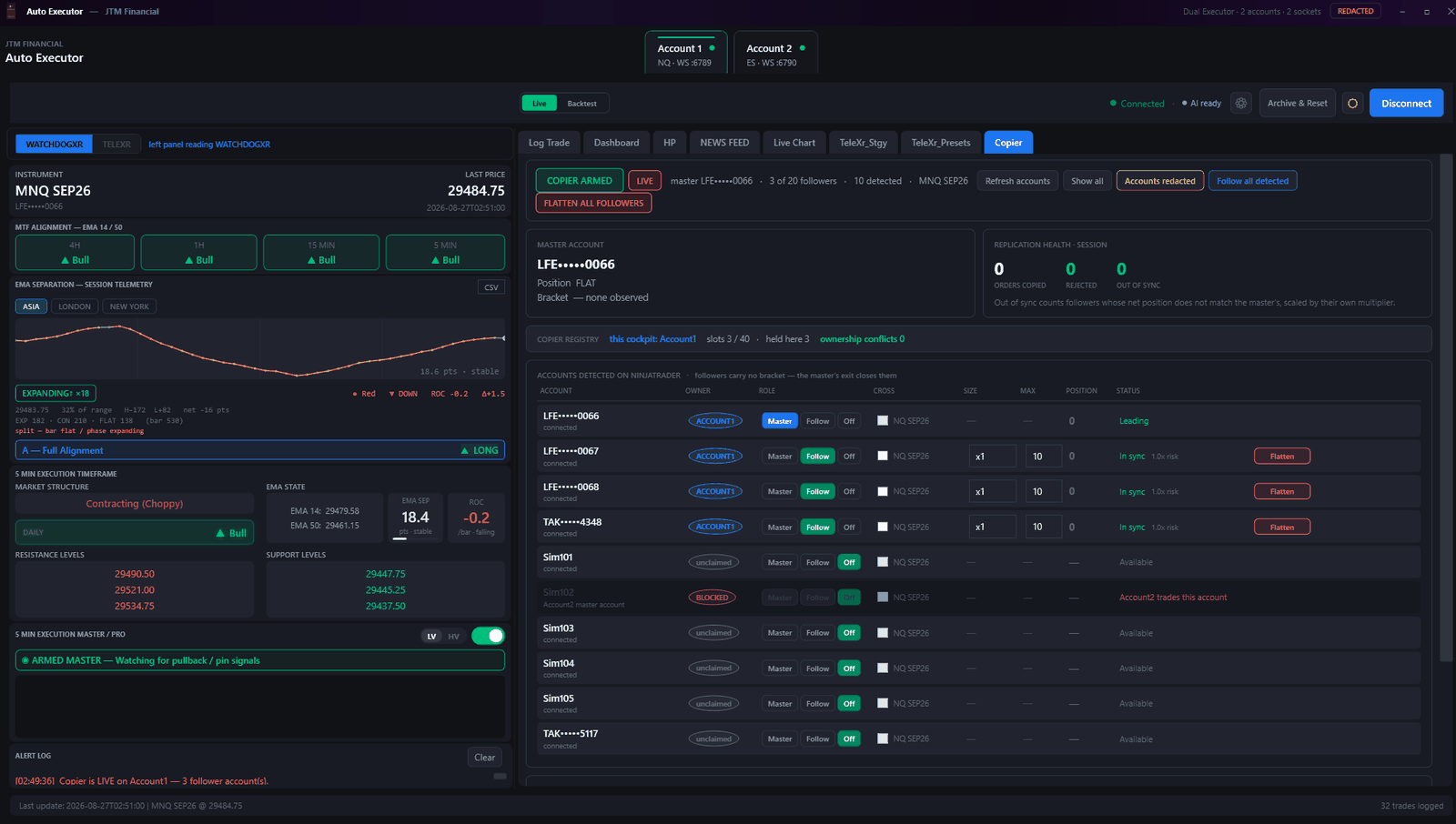
- It steers, it doesn't relay. The copier computes each follower's target position and corrects toward it. A follower that rejects an order heals itself on the next pass instead of drifting silently out of position.
- No account can be claimed twice. An ownership registry spans both cockpits. If Account 2 already trades an account, Account 1 sees it as BLOCKED and cannot enrol it — because two engines steering one account would fight forever.
- Per-follower sizing. Each follower carries its own multiplier and a hard maximum position, so a small account can follow a large one without inheriting its size.
- It stops when it cannot see. If follower state goes stale for five seconds the copier holds rather than acting on a position that may have moved. Replication health is on screen: copied, rejected, out of sync.
Privacy
One switch hides every account number
Look closely at the screenshots on this page. Every account reads LFE•••••0066. Nothing was edited — that is the app.
- Global. One control in the title bar masks account identifiers everywhere they appear — copier, journal, dashboard, strategy panel, PDF reports and CSV exports, across both cockpits.
- The last four digits survive so rows stay distinguishable and support can ask about "the one ending 0066" without you unmasking anything.
- Simulation accounts stay readable. Sim and Playback accounts are never masked, so anyone looking at your screen can tell at a glance whether it is live or simulated.
- Display only. Your stored trade history always keeps the real account name. The mask never reaches your records.
TeleXr
Pyramiding with a breakeven ladder
Add to a position on your terms, and move the stop as the trade earns it.
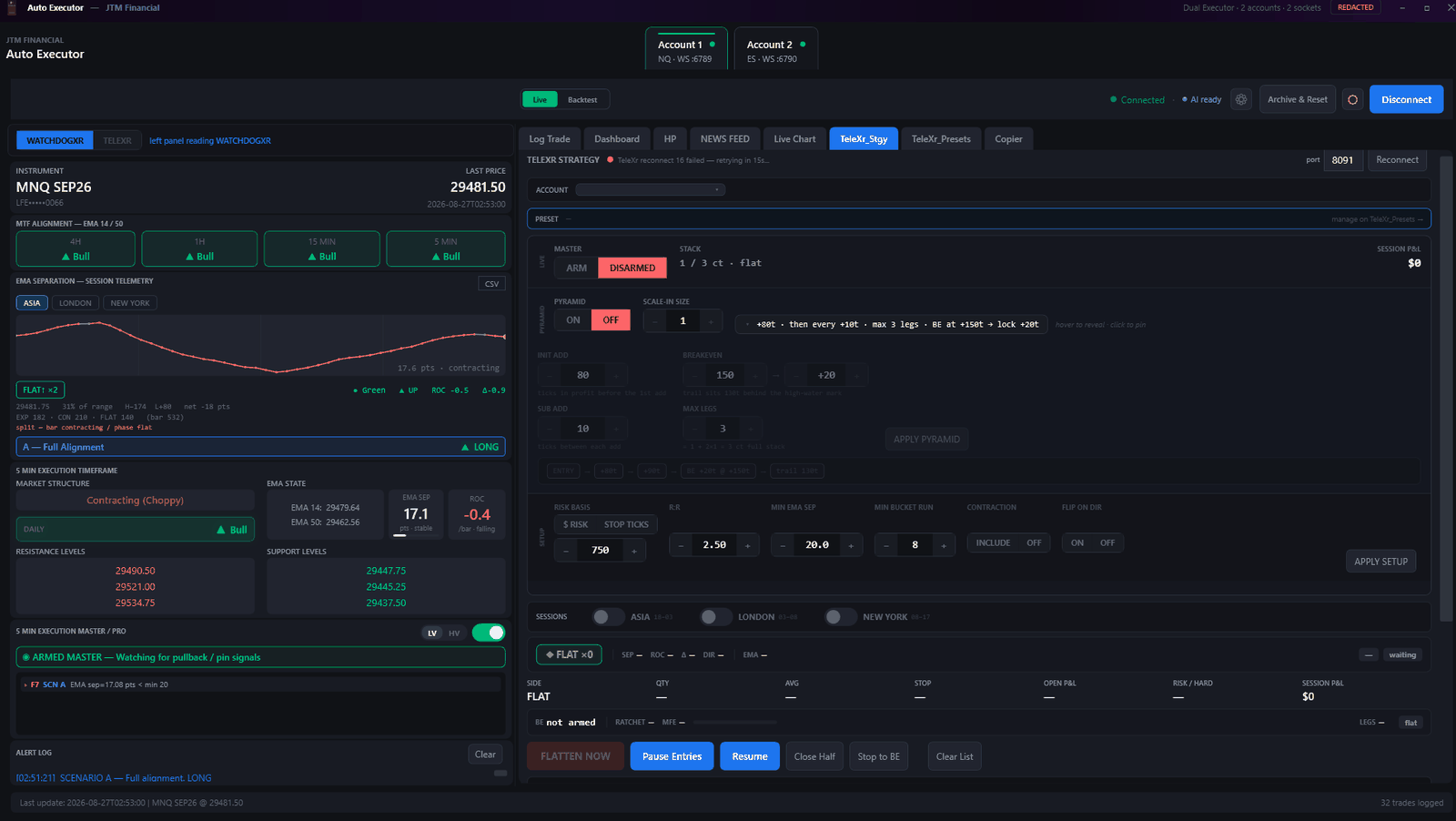
- Rules you set once. First add at a chosen tick profit, subsequent adds at a fixed spacing, a maximum leg count, then breakeven plus a locked buffer.
- Session gating. Enable Asia, London or New York independently. The engine stands aside outside the windows you chose.
- Entry filters. Minimum EMA separation, minimum bucket run, R:R floor and a contraction filter — each one a reason not to take a trade.
- Manual override, always. Flatten now, pause entries, close half, stop to breakeven. The engine never takes the wheel away from you.
The journal
Every execution scored, automatically
The trade log fills itself from your actual fills, then grades the execution against the plan.
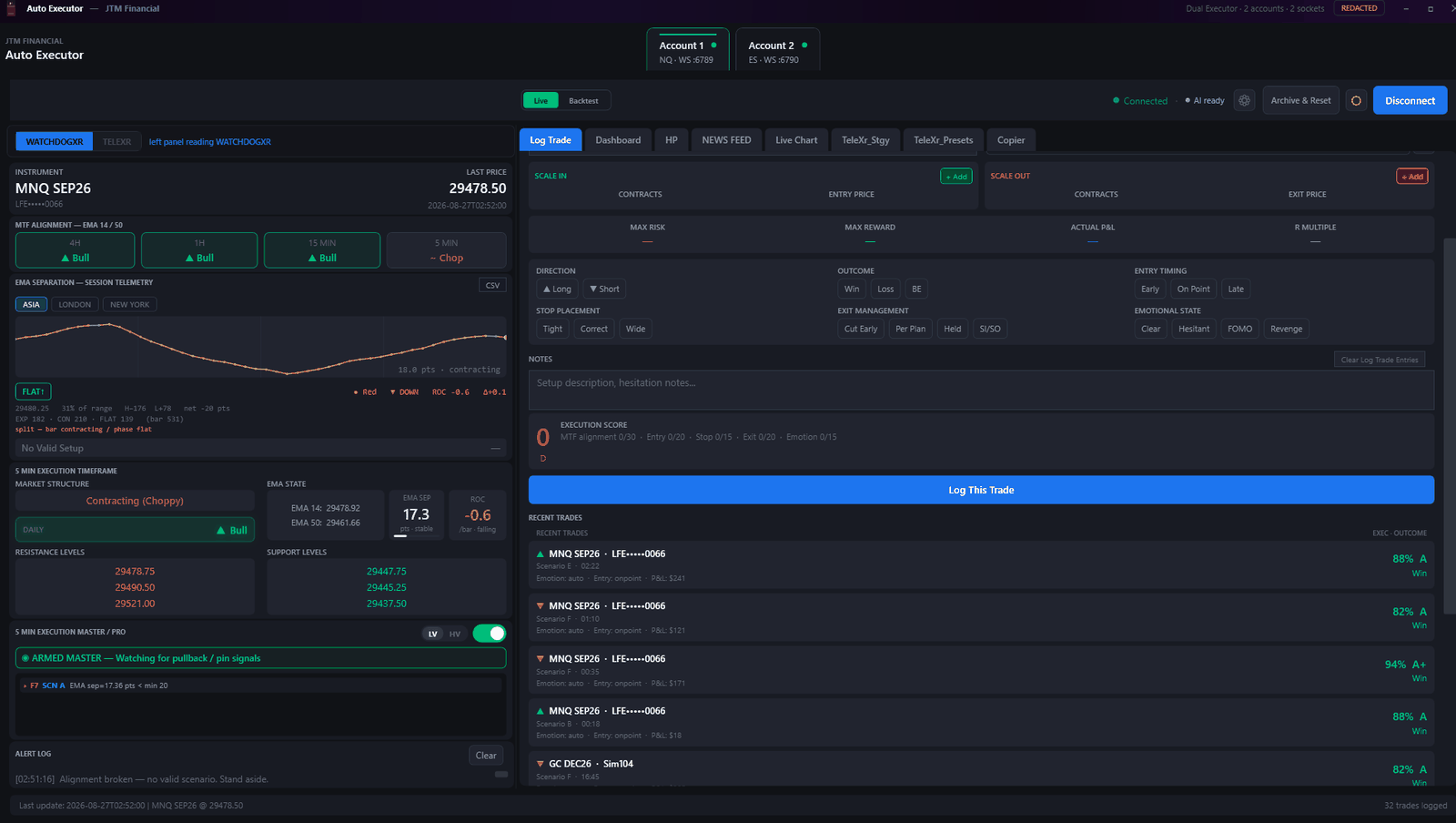
- Scored on process, not outcome. Multi-timeframe alignment, entry timing, stop placement, exit management and emotional state — a winning trade taken badly still scores badly.
- Filled in for you. Automated executions log themselves with instrument, account, scenario, structure and exit reason. Manual trades can be added by hand.
- Scenario tagging. Every trade carries the scenario that produced it, so you can see which of your setups is actually paying.
- Left panel context. MTF alignment, EMA separation telemetry, market structure and levels sit alongside, so the reasoning is captured with the trade.
Dashboard
Your own numbers, not ours
Daily, weekly, monthly and yearly views built entirely from the trades in your journal.
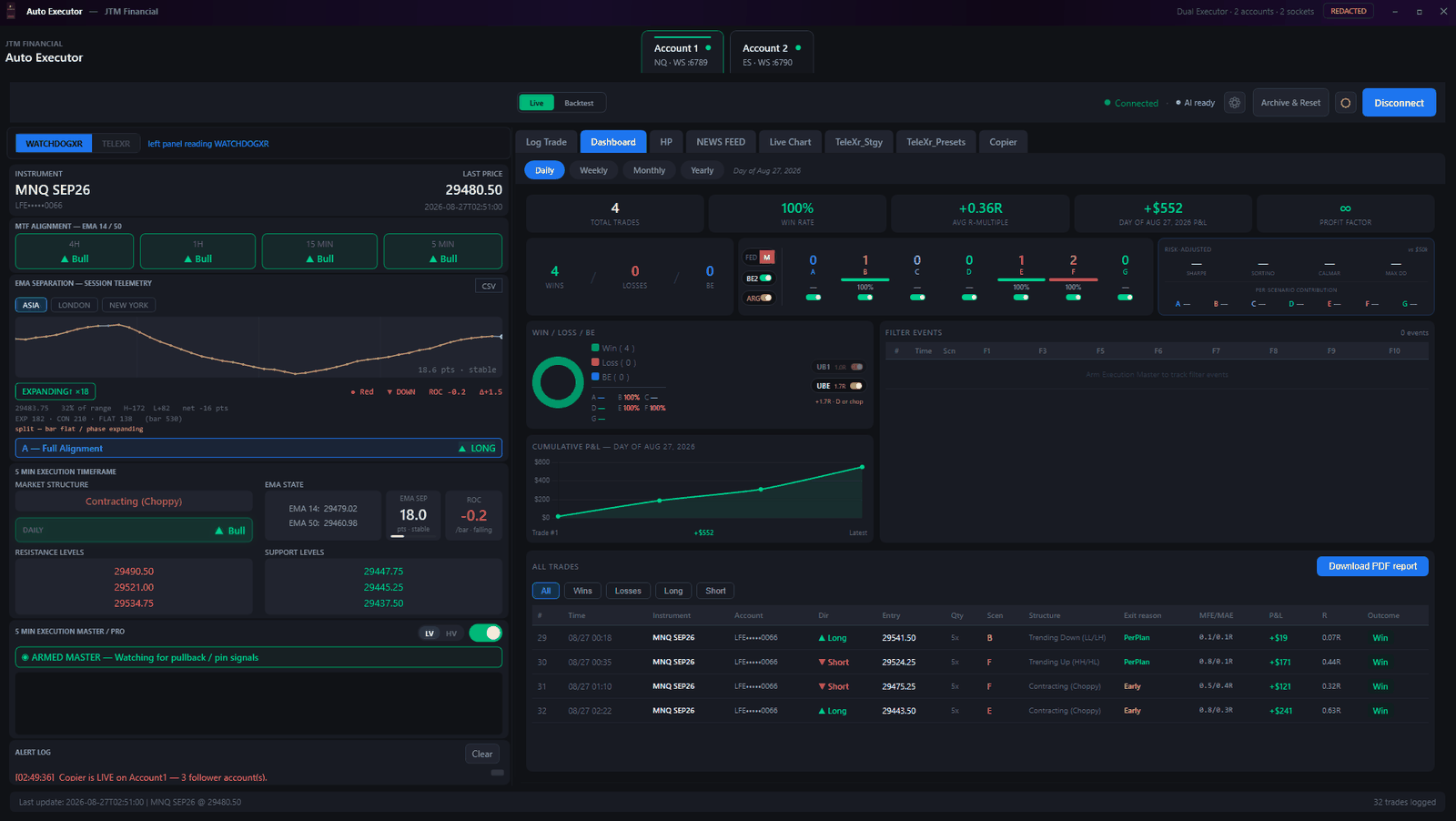
- Per-scenario contribution. See which scenarios produce your results and which quietly cost you.
- Risk-adjusted measures. Sharpe, Sortino, Calmar and max drawdown once there is enough history to compute them honestly.
- Filter events. A record of the trades the engine declined and why — often more instructive than the ones it took.
- Exports. PDF report and CSV, both of which respect the redaction switch.
What you need
Requirements
Documentation
Eighteen pages, with screenshots — running the installer, activating your licence, letting AutoExecutor place the NinjaTrader files for you, adding both engines to a chart, and the risk limits to set before you arm anything.
Validation study
Nine months, 1,882 trades, and what a bad run looks like
A backtest of the Project Noble build on NQ futures, October 2025 to June 2026, run through NinjaTrader 8 market replay.
Every number in this section is a hypothetical example produced by backtesting. No real money was at risk, no live orders were sent, and no customer account produced these results. Hypothetical performance has inherent limitations — see the full disclosure at the end of this section.
One contract per signal on a $150,000 reference account. Dollar figures scale with position size — two contracts roughly doubles both the profit and the drawdown.
The part most studies skip
Pass and fail criteria were fixed before the results were seen
It is easy to run a study and then decide afterwards what counts as success. These three thresholds were written down first, which is what makes the result mean anything.
At least 7 of 9 months profitable9 of 9
Net above $90,000$134,790
No month worse than −$6,000Worst month +$320
Monte Carlo
Ten thousand alternative nine-month campaigns
A single historical path tells you what happened once. Resampling it shows the range of outcomes a client account could see — including the unlucky ones.
Net P&L over nine months
10,000 resamples · shaded band is the middle half of outcomes
| Outcome | Net P&L | On $150k |
|---|---|---|
| 95th percentile | $197,617 | 132% |
| 75th percentile | $160,935 | 107% |
| Median | $135,180 | 90% |
| 25th percentile | $109,815 | 73% |
| 5th percentile | $72,874 | 49% |
Worst drawdown per campaign
10,000 resamples · shaded band runs from typical to unlucky (median to 95th)
| Depth of dip | Drawdown | On $150k |
|---|---|---|
| Typical (median) | −$16,485 | −11% |
| Unlucky — 1 in 20 | −$28,775 | −19% |
| Rare — 1 in 100 | −$37,261 | −25% |
| Chance the dip exceeds | Probability |
|---|---|
| $15,000 | 61.2% |
| $25,000 | 10.9% |
| $40,000 | 0.6% |
Where it came from
Three of the six scenarios lost money
Scenario E carried the study. D traded the most of any scenario and finished slightly negative. Both are shown, because a breakdown that lists only winners is not a breakdown.
| Scenario | Trades | Net P&L | Win rate | Profit factor |
|---|---|---|---|---|
| E | 698 | +$112,690 | 40.4% | 1.36 |
| A | 203 | +$29,580 | 40.9% | 1.32 |
| G | 84 | +$7,300 | 59.5% | 1.41 |
| B | 27 | −$745 | 37.0% | 0.91 |
| F | 25 | −$6,225 | 24.0% | 0.64 |
| D | 845 | −$7,810 | 57.5% | 0.96 |
The engine classifies each trade's context as trending or not, at entry. Trades taken in the conditions it flagged as trending earned $134 per trade across 543 trades; the rest earned $46 across 1,339 — a 2.9× concentration of edge in the conditions the classifier identifies.
Hypothetical performance results have many inherent limitations. They are prepared with the benefit of hindsight, and simulated programs in general are designed with it. Market replay does not reproduce live slippage, latency, fill quality or liquidity, and unlike an actual performance record these results do not reflect financial risk actually borne in live trading — or the effect of that risk on the decisions a person makes while a position is open. Nine months on a single instrument in one market period is a narrow window and is not proof of an edge that persists.
No representation is being made that any account will or is likely to achieve profits or losses similar to those shown. Past and hypothetical performance are not indicative of future results. Trading futures carries a substantial risk of loss and is not suitable for all persons.
Method. NinjaTrader 8 market replay, build ae-2.6.0-replay-validated, NQ index futures, one contract per signal, recorded trade-by-trade — 1,882 trades across 212 trading days, October 2025 to June 2026. Profit factor is gross profit divided by gross loss; drawdown is peak-to-trough on the cumulative equity curve in chronological order. The Monte Carlo uses 10,000 resamples via daily-block bootstrap, which draws whole trading days with replacement so intraday streaks stay intact rather than assuming each trade is independent — the assumption that would understate drawdown. It was cross-checked against a trade-level bootstrap, which produced a median of $134,135 and a 5th percentile of $71,110.
Full platform
Then $499 per month, starting on day 31.
How the billing works. Your licence key is emailed to you the moment the payment clears.
- At sign-up — you are charged $49.90. That covers your first 30 days, in full.
- Day 31 — unless you cancel first, your subscription renews automatically at $499 per month and recurs monthly until you cancel.
- Cancel any time. Cancel before day 30 and you are never charged the $499. The trial is yours to keep for its full 30 days either way.
Cancel from your account page or by emailing info@jtmfin.com. We will email you before the first $499 charge.
- Both execution engines, both cockpits
- Trade copier — up to 40 follower accounts
- Global account redaction
- Automatic journalling, scoring and dashboard
- PDF and CSV export
- Updates throughout your subscription
Get started
Two ways to start
Start your trial now, come to the free live tutorial, or both.
Start your 30-day trial
$49.90 today · then $499/month from day 31
Checkout is handled by Stripe. Your licence key and the installation guide are emailed to you as soon as the payment clears — usually within a minute.
- Both execution engines, both cockpits
- Trade copier — up to 40 follower accounts
- Automatic journalling, scoring and dashboard
- Updates throughout your subscription
Cancel any time before day 30 from your account page or by emailing info@jtmfin.com, and the $499 is never charged. We email you before the first $499 charge.
Live tutorial on YouTube
Sunday 20 September · 8:30 AM PT / 11:30 AM ET
A full walkthrough, free and open to anyone — you do not need a licence to attend. Installation, arming the engines, configuring the copier, and reading the cockpit, with questions answered live.