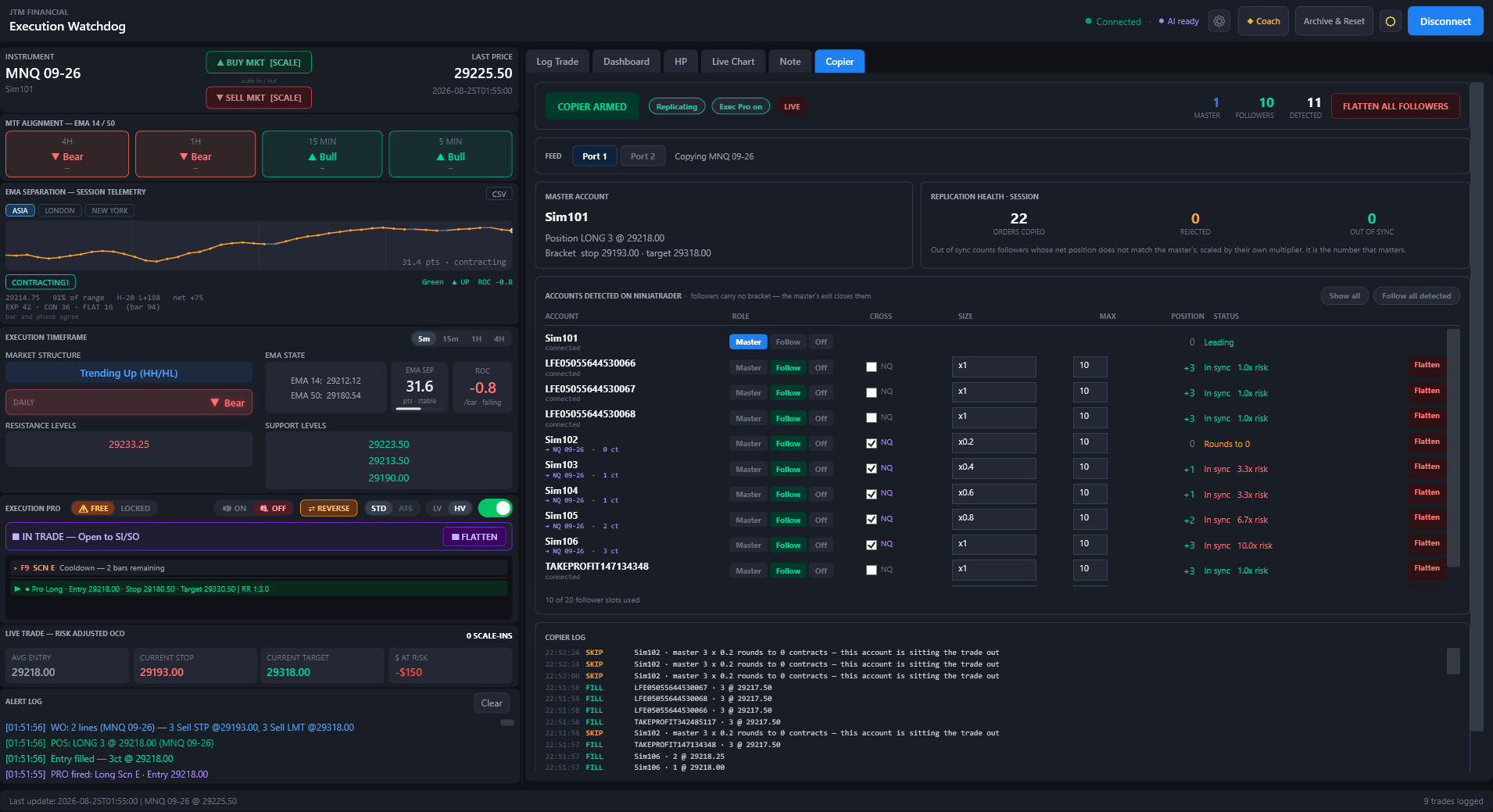
Execution Watchdog now does two things it has never done. It copies your trades to up to twenty NinjaTrader accounts — and it journals the trades you take by hand on the chart, not just the ones it fires itself.
APP v1.6.1NT8 INDICATOR v2.8.4RELEASE 30 AUG 2026PRICE UNCHANGED
One master account. Up to twenty followers, each with its own size, its own ceiling, and its own flatten button. The health panel counts what matters: orders copied, orders rejected, and how many accounts are out of step with the master right now.
The Trade Copier
It converges. It doesn’t relay.
This is the difference that decides whether a copier is still correct an hour into the session.
How most copiers work
Forward each order as it happens. One rejection — insufficient margin, a connection blip, a momentary lock — and that account is permanently out of step for the rest of the session. Nothing notices. Nothing repairs it. You find out when you go to flatten.
How Execution Watchdog works
Compute a target position for each follower and steer it there, continuously. An account that is already correct sends no order at all. An account that was rejected is retried on the next evaluation — so it repairs itself the moment margin frees up, with no intervention and no master activity required.
The number on the health card that matters is Out of Sync — how many followers hold a position that does not match the master’s, scaled by their own multiplier. In a healthy session it reads zero and stays there.
Sizing
Every account takes the size you gave it.
Set per follower, edited straight in the row, with a hard maximum position as a separate clamp.
Entry
What the account trades
x1
Match the master, contract for contract
x2
Twice the master
x0.2
One contract for every five the master trades
=3
Always three contracts, whichever way the master goes
Fractions truncate toward zero. Five contracts at x0.2 is one; four is none. Rounding up would hand you more size than you asked for, on the account where that matters most. Where a multiplier rounds an account out of a trade entirely, the log says so with the arithmetic — it never passes in silence.
Cross Instrument
Micro to mini, or mini to micro.
Tick Cross on a follower and it trades the other contract size of the same product. NQ becomes MNQ, MNQ becomes NQ, and the same for ES/MES, RTY/M2K, YM/MYM, CL/MCL, GC/MGC and the rest. The row then names the exact instrument and contract count it will trade, so a checkbox never commits you to something you have to work out for yourself.
Every crossed row shows its risk ratio in money, not contracts. A multiplier gives you no hint of what a cross actually costs: five micros crossed to one mini at x0.2 is twice the master’s exposure, and looks perfectly reasonable written as a multiplier. Watchdog puts the real number in the row — 1.0× is matched, amber past 1.1×, red past 2×.
The Exit Model
One exit, and it is the master’s.
Followers carry no stop and no target. The master’s bracket is the only exit in the system. It fires, the master goes flat, and every follower is closed by the same mechanism that opened it.
This is deliberate, and it is the single most important design decision in the release. Two exit authorities cannot coexist with a convergence engine: the moment a follower’s own stop fires while the master is still in the trade, the engine sees the gap and re-enters. The follower’s stop becomes an entry signal. Removing follower brackets removes that entire class of failure — and a copier that can turn your stop into an entry is not a copier you should be running on a funded account.
Safety
Built to be wrong safely.
Ships disarmed
Every session, without exception. The armed state is never remembered across launches.
Dry run by default
Computes and logs every order it would send, and sends none. Turning it off asks you to confirm, and names how many accounts are enrolled before you do.
Flatten is a state
Flattening a follower detaches it — flat, and out of the copier, until you resume it or the master starts a new trade. A flatten that only sent an order would be undone by convergence within the second.
Per-account flatten
A flatten button on every follower row, for when one account has to come off and the rest carry on.
Flatten All Followers
Closes every follower and never touches the master. Two independent guards enforce that.
Execution Pro gates it
Pro off means no master feed. Armed with Pro off reads as a red “Armed · no master feed” — never as a quiet, idle-looking copier.
Dead man
Followers hold no bracket, so if Watchdog goes away while they are holding, the indicator itself places one protective stop per account at the master’s last known level, fifteen seconds after the link drops. It does not flatten: a socket hiccup should not realise a loss, and an invented exit at a random price is worse than a stop at a level you chose.
Two charts, two feeds
Each chart’s indicator has its own WebSocket port. Run NQ on one and GC on another and choose which feed Watchdog is listening to — one at a time. Switching is refused while any follower still holds a position, because changing feeds would orphan them.
Also New
It now journals the trades you take by hand.
Until now the journal recorded the trades Execution Watchdog fired itself. Now it records yours.
Take a trade on the NinjaTrader chart — Chart Trader, an ATM, the DOM, however you normally work — and with Execution Pro on, the Log Trade form fills itself in as the trade develops. Entry price, contracts, stop, target, scale-ins, scale-outs, exit. You add the parts only you know: outcome, stop placement, exit management, entry timing, emotional state. Then log it.
It never touches your trade. No breakeven tier, no trail, no bracket repair, no flatten will ever act on a hand-taken position. The lane observes and reports; management stays where you put it, on the chart.
◆ PARTIAL FILLS
A 3-lot is a 3-lot
NinjaTrader splits a three-contract order into a 1 and a 2. That is one entry of three — not an entry and a scale-in — and the form now shows it that way.
◆ REVERSALS
A flip does not end the trade
The original entry stays in the header, the flip logs a scale-out and a scale-in, and the trade stays open until you flatten — identical to how a reversal fired from the app has always been journaled.
◆ HONEST R
Measured on the first stop
With a ratchet or trailing stop, the stop you finish with is not the risk you took. The journal latches the first stop it sees and denominates R against that, so a winner cannot flatter itself by trailing.
◆ REAL COMMISSION
The broker’s number
Net P&L uses real NinjaTrader commission rather than an estimate — and a position already open when the indicator loads is adopted rather than ignored.
Also New
It now watches the order book, not just itself.
Every safety check used to begin by asking Watchdog whether it thought it was in a trade. That is the right question almost always — and useless in the one case that matters, a position opened by an order the engine has forgotten. These three run regardless.
◆ ORDER-BOOK GUARDS
A stop with no position is an entry
If your account is flat and one of our protective stops is still working, that stop is no longer an exit — left alone it opens a new position in the wrong direction with nothing behind it. It is now cancelled within about two seconds. Runs armed or disarmed.
◆ NAKED POSITION
No stop of any kind, no position
A position with nothing behind it — not ours, not an ATM’s, not one you placed — is closed at market after three seconds. A hand trade carrying its own ATM bracket is left completely alone: your protection counts as protection.
◆ FASTER
Per tick, not per bar
The bracket watchdog checked once a bar. On a five-minute chart that is a five-minute window in which an unprotected position can run. It now checks every tick, and never acts on a normally bracketed trade.
◆ REDACT
For screenshots and screen shares
One button masks account numbers everywhere they are drawn or exported — header, dropdown, journal, Dashboard, PDF and CSV. LFE•••••0066. Sim and Playback stay legible on purpose. Orders route exactly as before and your saved history keeps the real name.
Also Fixed
Sharper where it counts.
Realised P&L now matches NinjaTrader exactly. The base leg was being overwritten with the position’s average price — a different quantity from the trade’s original entry, and one that diverges the moment you scale out. It now reproduces NinjaTrader’s figure to the cent.
A missed fill no longer poisons the session. NinjaTrader’s own position is now the authority, and a missed fill self-corrects within a tick.
The observed stop and target can no longer go missing. The bracket scan used to give up after about two seconds — before a busy ATM had placed its bracket. It now keeps looking for the life of the trade.
A fill on a different instrument can no longer be logged as this chart’s exit.
Execution Pro market orders are reliable again under copier load, and the shipped executable now reports its own version correctly.
Getting It
Update the indicator. That’s the whole upgrade.
If you already subscribe
v1.6.1 is included at your current price — nothing changes on your billing. Install the app update, then go to Settings → Install NT8 Indicator. Both new features require indicator v2.8.4, and the app will tell you plainly if it finds an older one rather than running half-wired. Your journal history, licence and settings are untouched.
If you’re new
Thirty-day free trial, cancel anytime — $99/mo or $950/yr. The copier, the manual journaling and everything Watchdog already did are in the same subscription. You will need NinjaTrader 8 and a live connection; the copier works on Sim accounts, which is exactly where you should start.
Recommended first run for the copier. Two Sim accounts, one master and one follower. Arm it and confirm the status reads Dry run. Take a one-lot trade on the master — the log should show the order and NinjaTrader should show nothing. Turn dry run off and repeat; the follower should fill and read In sync. Then hit Flatten All Followers while the master is still in the trade, and watch the follower go flat and stay flat. Only then a funded account, at x1.
Available August 30
Trade once. Everywhere.
Thirty-day free trial. Cancel anytime. Included at your current price if you already subscribe.
The trade copier places live orders in every enrolled account. Test it on Sim accounts before enrolling a funded one. Trading futures carries substantial risk of loss and is not suitable for every investor.